 neolinga
Live translation for churches, associations and events
Everyone follows along. In their own language.
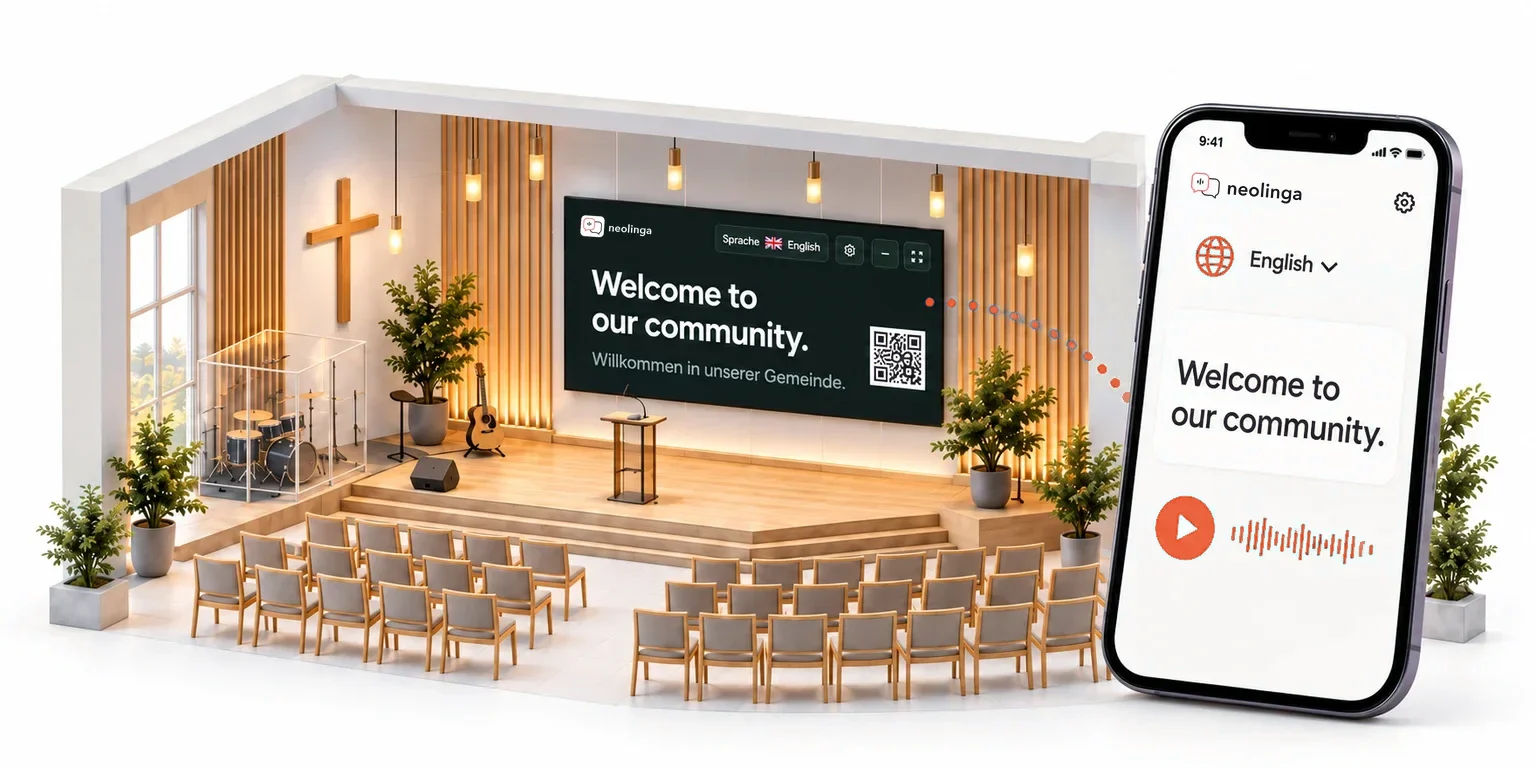
Your guests read and hear what is said up front, translated live on their own phone – no app needed. The screen shows the text for everyone.
One hour per month for free – no payment details.
Attending an event?
The number is shown on the screen or next to the QR code.
How it works
One scan is all it takes.
For your guests it is as easy as taking a photo. All you need is a laptop – with a microphone or connected to the mixer.
Scan the QR code
The link opens the translation right in the browser – nothing to install, no account.
Choose a language
Guests pick their language and can switch at any time.
Read and listen
The text follows live, and the spoken translation can play through headphones.
Use cases
Wherever several languages share a room.
From the weekly sermon to a once-in-a-lifetime family celebration.
Church services
Follow sermons, prayers and announcements live as text or audio. Translation pauses automatically during songs.
Conferences and trade fairs
Talks and panels for international guests – without receiver devices or interpreter booths.
Courses and training
Regular sessions with participants who speak different first languages.
Retreats and club evenings
Camps, partnership visits and gatherings with guests from abroad.
Information evenings and assemblies
Parent evenings, town meetings or consultations where everyone follows in their own language.
Family celebrations
A wedding or baptism with guests from several countries – every speech in the guests’ languages.
Features
Everything you need on site.
Included in every plan. Free is limited to 1 target language and 25 guests.
-
Projection screen
The translation in large type on a projector or display, in four text sizes and optionally with a QR code.
-
Guest access
Via QR code, link or seven-digit event number, optionally protected by an access code.
-
Several languages at once
Add or remove target languages at any time, even during the event.
-
Automatic pauses
Translation pauses by itself during silence, music and singing. That time is not charged.
-
Microphone or mixer
Capture right in the browser, including the line input of an audio interface – with a level meter before you start.
-
Transcripts for follow-up
Optionally stored for up to 30 days, with section markers and as a text file to download.
Pricing
You pay per hour, not per guest.
Billed per hour and target language, to the minute.
Free
For trying it out: 1 target language, up to 25 guests at a time.
€0/ month
1 hour per month No payment details
Start for freeStartRecommended
For example, 75 minutes a week in one language.
€29/ month
7 hours per month €4.14 per hour
Choose StartPlus
For example, 90 minutes a week in two languages.
€59/ month
16 hours per month €3.69 per hour
Choose PlusPro
For example, 90 minutes a week in four languages.
€109/ month
33 hours per month €3.30 per hour
Choose Pro
No subscription – buy once
Flex · 5-hour package
For one-off dates or as a top-up to a subscription.
- Valid for 12 months
- No subscription to cancel
- No automatic top-up
€25one-time
5 hours €5.00 per hour
The price list for churches, associations and private persons applies to non-commercial use, self-declared when ordering. All prices are final prices; no VAT is charged under the German small-business exemption (§ 19 UStG).
Plan calculator and all detailsFAQ
Frequently asked questions
What organizations want to know before their first event.
What equipment do I need?
A laptop with a current browser and internet access, plus a microphone or the output of your mixer. For the screen, a second browser window on the projector is enough. Your guests only need their phone.
How are hours counted?
Translated speaking time is counted per target language, to the minute. One hour in three languages is three translation hours – no matter how many guests listen. With automatic pauses, silence, music and singing are not counted.
How reliable is the AI translation?
The translation is usually easy to follow but can contain errors, for example with names or technical terms. Test your microphone, connection and target languages before the event.
What happens to the data?
Audio is sent to Google Gemini for live translation; neolinga keeps no audio archive. neolinga only stores transcripts if you switch on saving, and only from that point on.
How do I get started?
Create an account and your organization. Free includes one translation hour per month; no payment details are needed. If the daily registration limit is reached, the platform team needs to approve your account first.
What happens when the balance runs out?
Translation stops and nothing is charged automatically. You can buy a Flex package or a subscription at any time; the Free allowance is available again next month.
Try it at your next event.
One hour per month for free, no payment details.